What Is the Adtran Box Plugged Into the Wall? A Complete Homeowner’s Guide
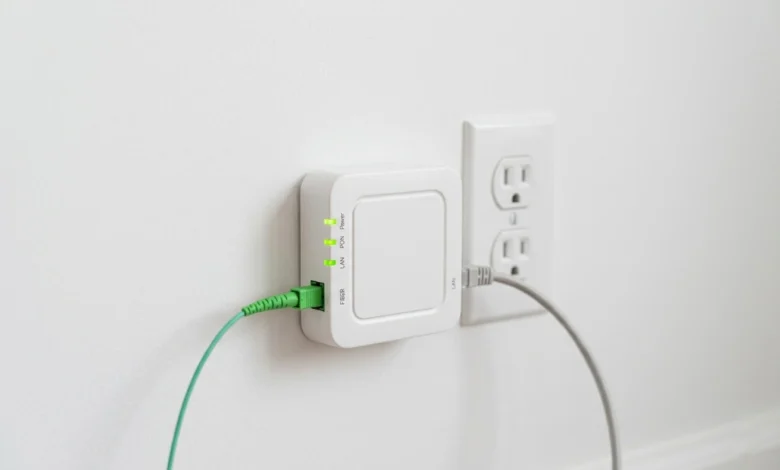
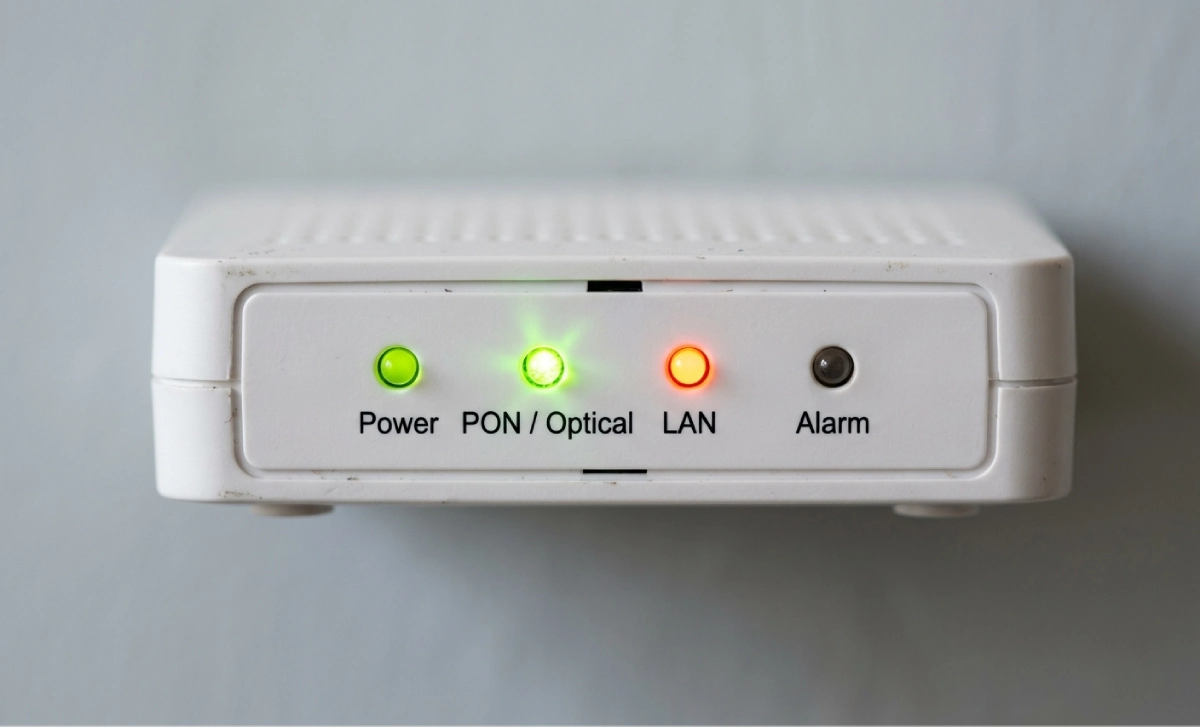
The Adtran box plugged into the wall is an Optical Network Terminal (ONT). Your fibre internet provider installs it to convert fibre-optic light signals into standard Ethernet signals that your router can read. It sits at the entry point of your home network, belongs to your ISP, and must stay powered on for your internet and phone service to work.
What Is the Adtran Box Plugged Into the Wall?
You noticed a small white or grey box mounted near a wall outlet. Maybe an ISP technician put it there on installation day, or maybe you moved into a home that already had fibre. Either way, that box has a job to do, and knowing what it is saves you a lot of confusion when something goes wrong.
The Adtran box is an Optical Network Terminal, commonly shortened to ONT. Adtran is the manufacturer, not the service itself. The company is one of the largest suppliers of fibre networking equipment in the world, and its hardware shows up in homes across the United States and beyond.
Adtran reported revenue of $291.6 million in Q4 2025, exceeding the high end of its guidance range and marking its sixth consecutive quarter of sequential growth, which reflects just how widely its equipment is being deployed as fibre expands into more neighbourhoods.
How the Adtran ONT Works Inside Your Home
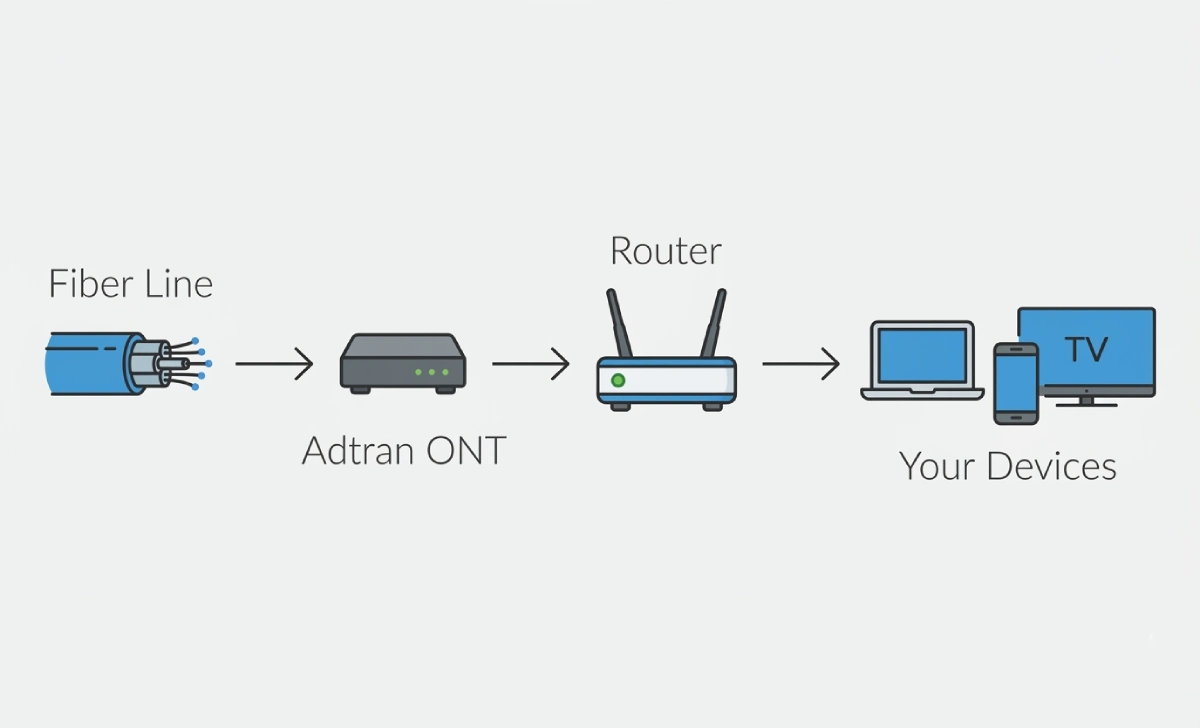
Fibre-optic cables carry data as pulses of light. Your router, laptop, and smart TV cannot read light signals directly. The Adtran ONT sits between the fibre line and your home network and does the translation.
Here is what the signal path looks like:
- A fibre cable runs from the street or utility pole into your home
- It connects to the green port on the Adtran ONT
- The ONT converts light signals into electrical Ethernet signals
- An Ethernet cable carries that signal from the ONT to your router
- Your router then distributes the internet to all your devices
Without the ONT working correctly, nothing else in that chain functions. It is the first and most critical piece of your home internet setup.
Adtran ONT vs. Modem vs. Router: What Each One Does
This is where most homeowners get confused, and understandably so. The three devices look similar and sit near each other, but they do completely different things.
A traditional modem connects to cable or DSL lines and converts those signals into Ethernet. A router takes an Ethernet connection and shares it across your home through Wi-Fi or wired ports. The ONT is neither of those. It is a fibre-to-Ethernet converter that only works with fibre-optic lines.
You cannot replace your Adtran ONT with a regular cable modem. They are not interchangeable. The ONT does not broadcast Wi-Fi on its own, either. It needs a router connected to it before any device in your home gets online.
Think of the ONT as the translator and the router as the distributor.
Common Adtran ONT Models You Might See
The model sitting on your wall depends on when the fibre was installed and which provider runs your service.
Adtran 411 and 424RG: These compact micro-ONTs are the most common in older fibre installations. They are wall-mounted, draw power from a nearby outlet, and handle standard gigabit service reliably. The model number is usually printed on a sticker on the bottom or side of the unit.
Adtran SDX 600 Series: Newer installs, especially on multi-gig fibre plans, often use the SDX 600 series. These ONTs support XGS-PON technology for delivering symmetric 1/2.5/5/10G services over fibre networks, and they also support IPTV and VoIP for premium residential services.
Adtran 841 Mesh Unit: Some providers pair the main ONT with a mesh extender. The Adtran 841 mesh unit is plug-and-play: plug it into a power outlet, and as long as it is within range of the main router, it automatically finds and connects to the network, with no configuration needed on your part.
Which Internet Providers Use Adtran ONTs
Adtran hardware is deployed across a wide range of fibre internet providers. You are most likely to see one if you have service from:
- AT&T Fiber
- Frontier Fiber
- CenturyLink (Quantum Fibre)
- IdeaTek
- Various regional fibre co-ops and municipal broadband providers
Adtran announced in February 2025 that Openreach has passed 8.6 million premises using its SDX optical line terminal platform, highlighting the rapid growth of fibre network deployment where Adtran technology plays a central role. That same scale is reflected in residential deployments across North America.
The brand on the box does not change how it functions. Your provider configures it for their specific network.
Understanding the LED Lights on Your Adtran ONT
The indicator lights on the front of the unit tell you the status of your connection at a glance. Here is what each one means:
- Power light (solid green): The unit has electricity and is running normally. If this light is off, check the power adapter.
- Optical or PON light (solid green): A healthy fibre signal is reaching the unit. A red or absent light usually means a fibre problem on the provider’s side.
- LAN light (solid or blinking green): Your router is communicating with the ONT. A blinking light during data transfer is normal.
- Alarm light: This should stay off. A steady red alarm almost always points to a fibre-side issue that requires your provider to investigate.
A blinking optical light during startup is expected. A solid red alarm light is not.
How to Reboot Your Adtran ONT Correctly
Power cycling the ONT clears most minor connection issues and takes less than two minutes. Follow these steps:
- Unplug the power cable from the side of the ONT
- Wait a full 15 seconds before plugging it back in
- Let the unit power back up completely before checking your connection. This usually takes one to two minutes.
Do not press or hold any buttons. There are no settings to reset, and the unit will come back online on its own. If your problem persists after the reboot, reboot your router as well before calling your ISP.
One thing to avoid: never disconnect the small green fibre connector. That port is where the fibre cable plugs into the ONT, and the fibre tip is extremely delicate. Even a small amount of dust can degrade your signal.
Troubleshooting Common Adtran ONT Problems
Most issues fall into one of four categories:
Power light is on, but no internet: The ONT is fine. The problem is likely your router. Reboot the router first before calling your provider.
Red alarm light: This almost always means a Fibre signal problem that originates outside your home. Contact your ISP to check the line.
Optical light is off: No fibre signal is reaching the unit. Check whether the fibre cable running into the ONT has been bent sharply or pulled loose, then contact your provider if nothing looks physically wrong.
Normal lights but slow speeds: Connect a laptop or desktop directly to the ONT via Ethernet cable and run a speed test. If speeds improve dramatically, your router is the bottleneck. If speeds are still slow, the issue is on the network side.
A useful rule: if rebooting both the ONT and the router does not fix the problem within 10 minutes, contact your provider directly.
Do You Own the Adtran Box?
No. The ONT belongs to your internet service provider, not you. They install it, maintain it, and replace it if it fails through normal use. If you move out of the property, leave the ONT on the wall.
Do not try to uninstall or relocate it yourself. If the ONT needs to be moved, your provider will do it. Damaging the unit could result in a replacement charge.
Can You Swap the Adtran Box for Your Own Equipment?
You cannot replace the ONT with equipment you purchase yourself. Unlike cable modems, which have a retail market and can be bought at any electronics store, fibre ONTs are provisioned specifically for your account on your provider’s network. There is no consumer version you can just swap in.
What you can change is your router. Upgrading to a better router, or adding a mesh Wi-Fi system, will do far more to improve your home internet experience than anything you could do with the ONT itself.
Internal link suggestion: See also [How to Choose the Right Wi-Fi Router for Your Home] or [Mesh vs. Traditional Router: What Works Best for Large Homes]
Where ISPs Typically Install the Adtran ONT
The technician picks the installation location based on where the fibre cable enters your home and where a power outlet is nearby. Common spots include:
- A utility closet or hallway wall
- The garage near the main electrical panel
- A basement utility area
- An exterior wall in a laundry room or storage space
If yours is tucked behind boxes or equipment, keep that area clear. ONTs generate a small amount of heat and need adequate airflow. They also need their power outlet to stay accessible in case you need to reboot.
FAQs
What happens if I unplug the Adtran box?
Your internet goes down immediately, and any landline phone service running through the ONT stops as well. Unplugging it briefly to reboot is fine. Just plug it back in after 15 seconds.
Why is my Adtran box showing a red light?
A red alarm or optical light almost always means a problem with the fibre connection, either at the unit or somewhere between your home and the provider’s equipment. Rebooting the ONT once is worth trying. If the red light returns after a restart, call your ISP.
Can I move the Adtran box to a different room?
Not on your own. The fibre cable running into it has a fixed path through your wall. Moving the ONT requires a technician to re-route the fibre line, which is a provider’s job. Request a relocation through your ISP.
Does the Adtran box need to stay on all the time?
Yes. It draws very little power, and keeping it on maintains your internet connection 24/7. Turning it off frequently can also cause the unit to take longer to re-sync with the provider’s network.
Is the Adtran box the same as a modem?
No. A standard modem works with cable or DSL. An ONT like the Adtran unit works only with fibre. They perform a similar conversion function, but they are not the same technology and cannot substitute for each other.